FAQs in this section
Where do I find the custom module?
Can I send SMS from a custom module ?
How can I categorize expenses and display the updated totals on the Project page when new expenses are added?
Can I create a custom module that works like Quotes with Line Items?
How do I display additional columns from a custom module in a related list?
How do I delete a custom module?
How do I create a custom module?

Can we change the parent app of a module?

As an admin, you can move custom modules between app categories.
Follow the steps below to change the parent app of a module:
  1. Log in to the CRM.
  2. Go to the main Menu.
  3. Click Settings. The Settings page opens.
  4. Click Modules under the Module Management section. The Module Manager page opens.
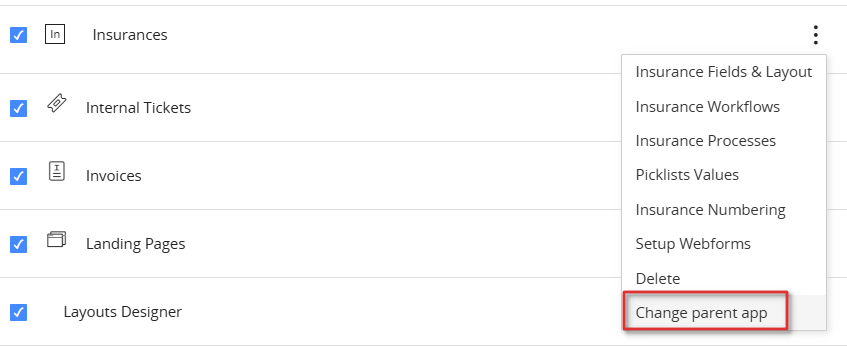
  5. Click More(ellipsis).
 
  1. Click Change parent app.
 
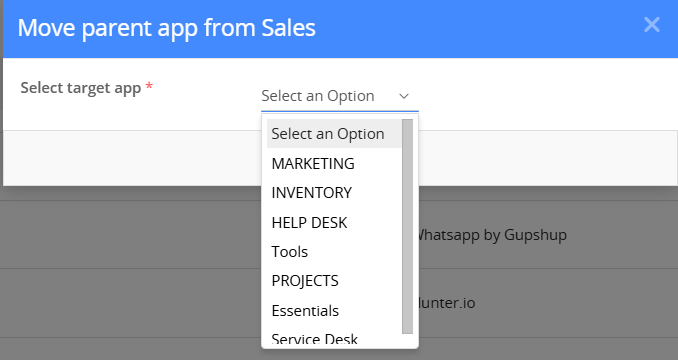
  1. Select the target app.
  2. Click Save.
Home Privacy Policy Terms of Service Security Center Policy & Legal Center Contact Us
© Copyright 2025 Vtiger. All rights reserved.
Powered by Vtiger
Facebook Twitter Linkedin Youtube