Articles in this section
Conversation Insights
Feature Availability
Vtiger Editions: One Growth | One Professional | One Enterprise | One AI
Introduction
Conversation Insights in Vtiger CRM provides a consolidated and intelligent view of all interactions related to a Deal. It analyzes customer conversations and surfaces meaningful insights that help sales teams understand Deal progress, customer sentiment, and engagement patterns.
By accessing Conversation Insights from a Deal record, users can view key information such as Sentiment analysis, Competitor mentions, Deal Score, Predicted Close Date, Conversation Timeline, and Touchpoint Summary. These insights enable sales teams to monitor different stages of a Deal, evaluate customer intent, and make informed decisions to improve Deal closure rates.
Note: To view Conversation Insights, you must install and enable Calculus AI from the Add-ons page.
Components of Coversational Insights
Conversation Insights consists of multiple components, each designed to provide a specific perspective on customer interactions and Deal progress.
Competitors
Displays the number of competitors mentioned by the customer during Deal-related conversations. This helps sales teams understand competitive pressure and adjust their sales strategy accordingly.
Sentiments
Analyzes customer interactions and categorizes them as Positive, Neutral, or Negative. Sentiment indicators help teams assess customer satisfaction and identify potential risks early.
Deal Score
Graphically represents the overall health and closure potential of a Deal. The score is calculated using engagement levels, sentiment trends, and interaction quality.
Predicted Close Date
Provides an AI-generated estimate of when the Deal is likely to close, based on historical data, recent interactions, and customer engagement trends.
Conversation Timeline
The Conversation Timeline organizes all Deal-related interactions, making it easy to track communication history. Conversations are categorized by Channel, Category, and Sentiment for better analysis.
By Channel
Displays monthly conversations across various communication channels, including:
- Emails
- Phone Calls
- Email Campaigns
- Chats
- Documents
- Meetings
- Web Activity
Clicking a vertical bar in the graph displays details such as the interaction channel, subject, and sentiment. Selecting an email subject opens the complete conversation.
By Category
Displays conversations grouped into predefined categories, including:
- Competitor Mentions
- Feature Discussions
- Playbook References
- Value Propositions
- Pricing Conversations
- Timeframe Discussions
- Other Topics
Each category is color-coded for easy identification. Clicking a vertical bar displays additional details related to the conversations.
By Sentiment
Displays monthly conversation trends based on sentiment:
- Positive
- Neutral
- Negative
Clicking a vertical bar reveals the associated conversations, enabling sales teams to take necessary follow-up actions.
Touchpoints Summary
The Touchpoints Summary provides a consolidated view of customer engagement for a specific Deal. It displays the total number of interactions across multiple channels, including:
- Emails
- Webchat
- Web Activity
- Cases
- Calendar events
- Email Campaigns
- Phone Calls
Customer interactions are grouped based on assigned roles such as Influencers and Decision Makers.
Roles are assigned to Contacts linked to a Deal based on their contribution and involvement in the sales process.
By Owners
The By Owners section displays the name of each sales executive along with the count of Emails, Webchat, Web Activity, Cases, Calendar events, Email Campaigns, and Phone Calls initiated by them for the Deal.
Use Case
A sales executive is managing an active Deal with multiple customer interactions across emails, meetings, and calls. By reviewing Conversation Insights, the executive identifies competitor mentions in discussions, observes sentiment trends across different Deal phases, and reviews the overall Deal Score to assess Deal health. The Conversation Timeline helps track communication history across channels, while the Predicted Close Date provides an AI-based estimate of when the Deal is likely to close.
Using the Touchpoints Summary, the executive notices that influencers are highly engaged, but the decision maker has limited interactions. This insight prompts targeted follow-ups with the decision maker and adjustments to the sales approach. As a result, the sales team gains better visibility into customer intent, addresses risks proactively, and improves the likelihood of closing the Deal on time.
Benefits of Conversation Insights
The Benefits of Conversation Insights are:
- Improved Deal Visibility - Get a complete view of Deal progress by analyzing all customer interactions, sentiments, and engagement trends in one place.
- Data-Driven Decision Making - Use AI-powered insights such as Deal Score, sentiment trends, and predicted close dates to take informed actions and prioritize high-potential Deals.
- Better Customer Understanding - Analyze conversations across multiple channels to understand customer expectations, concerns, and buying intent more accurately.
- Enhanced Sales Engagement - Identify the right time and approach to engage with customers based on sentiment analysis and interaction history.
- Early Risk Identification - Detect negative sentiment, reduced engagement, or stalled conversations early and take corrective action to prevent Deal slippage.
In this article, you will learn about:
- Accessing Conversation Insights
Key Terminology
|
|
|
|
|
|
|
|
|
|
|
|
|
|
|
|
|
|
|
|
|
Accessing Conversation Insights
Follow these steps to access Conversation Insights for a Deal:
- Log in to the CRM.
- Click the main Menu.
- Go to Sales.
- Navigate to Pipeline Management > Deals. The Deals List View opens.
- Click on a Deal record. The Summary View of the Deal opens.
- Go to One View.
- Click Conversation Insights. The Conversation Insights page opens.
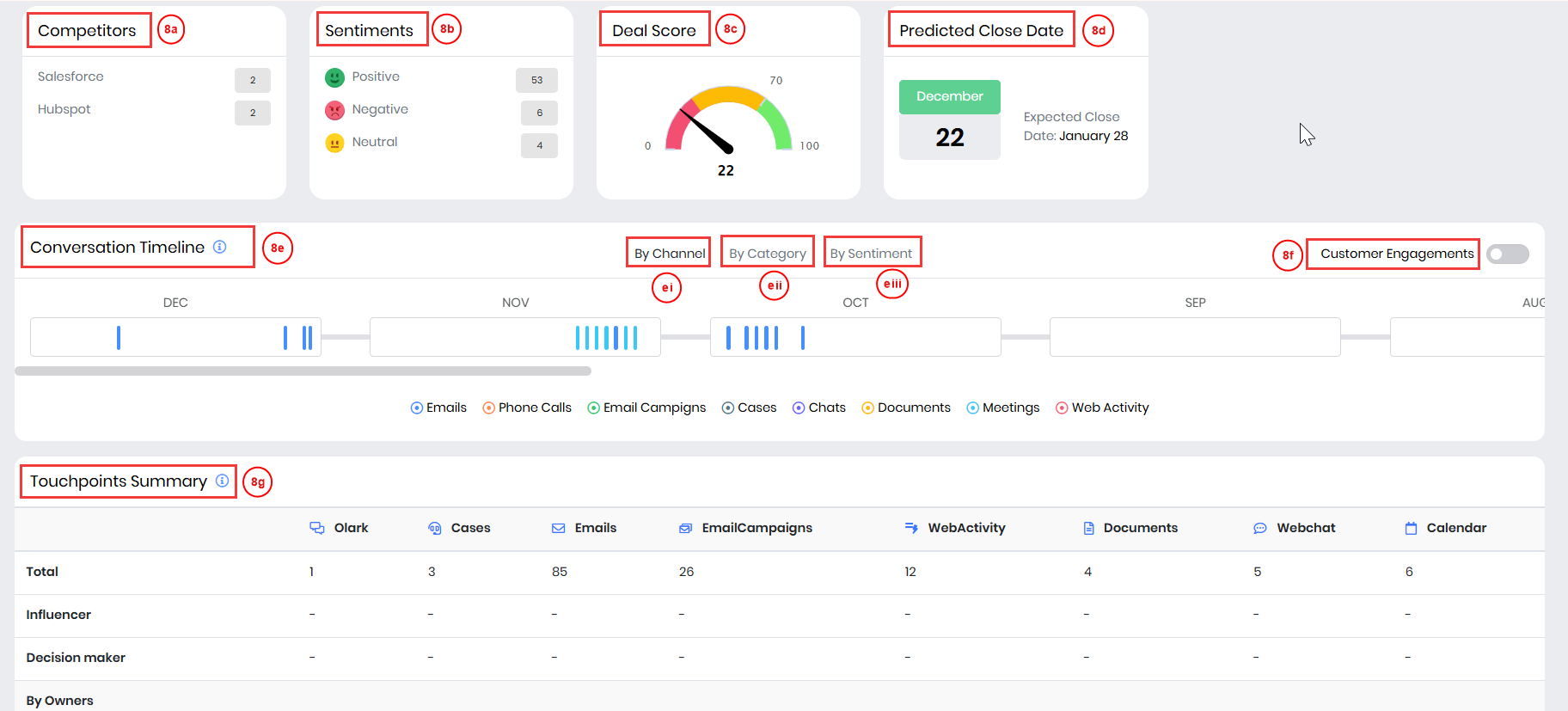
- View the following details on the Conversational Insights page:
- Competitors - Displays the number of competitors mentioned by the customer during interactions.
- Sentiments - Categorizes interactions as Positive, Neutral, or Negative based on sentiment analysis.
- Deal Score - Graphically represents the overall score of the Deal.
- Predicted Close Date - Provides an estimated Deal closure date based on AI analysis.
- Conversation Timeline - Shows all deal-related interactions in the order in which they happened across various communication channels.
- By Channels
- By Category
- By Sentiment
- Customer Engagements – Displays all customer-initiated conversations across multiple channels when the toggle is enabled, including emails, chats, and other interactions.
- Touchpoint Summary - Summarizes customer interactions across multiple channels, highlighting engagement from influencers and decision-makers.