Articles in this section
Contact Sentiment
Feature Availability
Vtiger Editions: One Professional | One Enterprise | One AI
Introduction
Contact Sentiment in Vtiger CRM captures customer emotions through feedback emojis collected after Events. When a Contact participates in an Event, and the Event is marked as Held, a feedback pop-up appears, allowing the Contact to select an emoji that reflects their experience.
This feedback emoji is automatically displayed in both the Event record and the associated Contact record, ensuring that customer sentiment captured during interactions is consistently reflected across the CRM. This helps businesses understand customer emotions and personalize engagement strategies effectively.
Use Case
A sales representative schedules a product demo using the Events module and adds a Contact as a participant. After the demo is completed, the Event status is changed to Held. At this point, a feedback pop-up appears, prompting the Contact to select a sentiment emoji.
The Contact selects a Positive Active emoji to indicate satisfaction with the discussion. This emoji is immediately recorded in the Event record and also updated in the Contact Sentiment field of the Contact record. When the sales team views either the Event or the Contact, they can clearly see the customer’s sentiment and plan the next steps accordingly.
Benefits of Contact Sentiment
The benefits of Contact Sentiment in Vtiger CRM are:
- Helps track customer emotions over time by maintaining a history of sentiments captured from different interactions.
- Provides actionable insights that help improve customer satisfaction and strengthen long-term relationships.
- Enables businesses to measure customer experience and use sentiment data to improve products, services, and engagement strategies.
In this article, you will learn:
- Types of Contact Sentiment
Key Terminology
|
|
|
|
|
|
|
|
|
|
|
|
|
|
|
Types of Contact Sentiment
Contact Sentiment represents the emotional response provided by a Contact after participating in an Event. When an Event involving a Contact is marked as held, the Contact selects a feedback emoji that reflects their experience. Based on this feedback, Vtiger CRM categorizes the sentiment into predefined types, allowing teams to quickly understand the customer’s emotional state and satisfaction level.
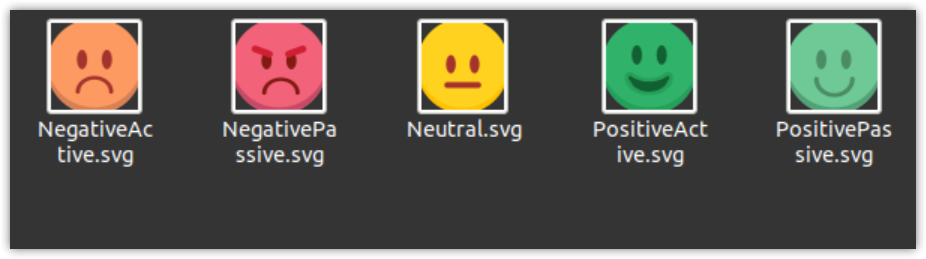
There are five types of Contact Sentiment:
- Positive Passive - When the emotion of the conversation is happy but not satisfied completely, the Contact Sentiment is represented by a smiling, positive emoji in a light dark green color.
- Positive Active - When the emotion of the conversation is extremely happy, the Contact Sentiment is represented by a smiling positive passive emoji in a light green color.
- Neutral - When the emotion of the conversation is neither happy nor sad, the Contact Sentiment is represented by a neutral yellow-colored emoji.
- Negative Passive - When the emotion of the conversation is unhappy and dissatisfied, the Contact Sentiment is represented by a negative emoji in pink color.
- Negative Active - When the emotion of the conversation is extremely sad, the Contact Sentiment is represented by a negative passive emoji in orange color.