Articles in this section
Vtiger Release Notes December 2025
Vtiger Release Notes November 2025
Vtiger Release Notes September 2025
Vtiger Release Notes August 2025
Vtiger Release Notes July2025
Vtiger Release Notes June 2025
Vtiger Release Notes May 2025
Vtiger Release Notes April 2025
Vtiger Release Notes March 2025
Vtiger Release Notes February 2025
Vtiger Release Notes January 2025
Vtiger Release Notes October 2025
B
Bindu Rekha Babu
25 Dec, 2025 - Updated
3 months ago
Release Notes 2
Features(s)
Platform User - New User License Type
- A new user license type called Platform User is available at a fee of $5 per month + an application fee determined by the publisher
- Platform users can use only the following: MyApps, VTAP, and VCAP runtime (/ui-api or /api).
- Platform users can’t log in or use CRM Web, Mobile, and Webservice interfaces, and the following modules will be disabled:
- Inbox
- Sales Insights
- Reports
- Dashboards
- Note: If the user visits the CRM URL directly or post-login, they will be redirected to MyApps - both in CRM & Mobile.
Enhancement(s)
Approvals
- Option to make approver or requester note as mandatory.
- You can configure Approver Note and Requester Note fields as mandatory. If these fields are enabled, the approver or requester will have to add their notes during record creation or update operations.
- This will ensure that the approver or requester adds their notes while approving or rejecting transactions.
Customer Portal
- The drag and drop option is now available while configuring or rearranging the fields in Settings > Customer Portal layout.
- Changing the display will reflect in the List and other views of the Customer Portal.
Field Sales App
- Approvers will now be able to view the following summary details of a beat plan before approving it: User & Beat, Organisations, Actions, Schedule
- A Beat Plan going for approval will create Routes and Events only after the Approver approves it. The Beat plan will create Routes and Events only on the following statuses:
- Auto Approved
- Approved
- Not Applicable
- If the Approver rejects, the Routes and the Events for the Beat plan are not created. The Beat Plan will not create Routes and Events on the following Approval statuses:
- Waiting for Approval
- Rejected
- Not Submitted
Forecast & Quota
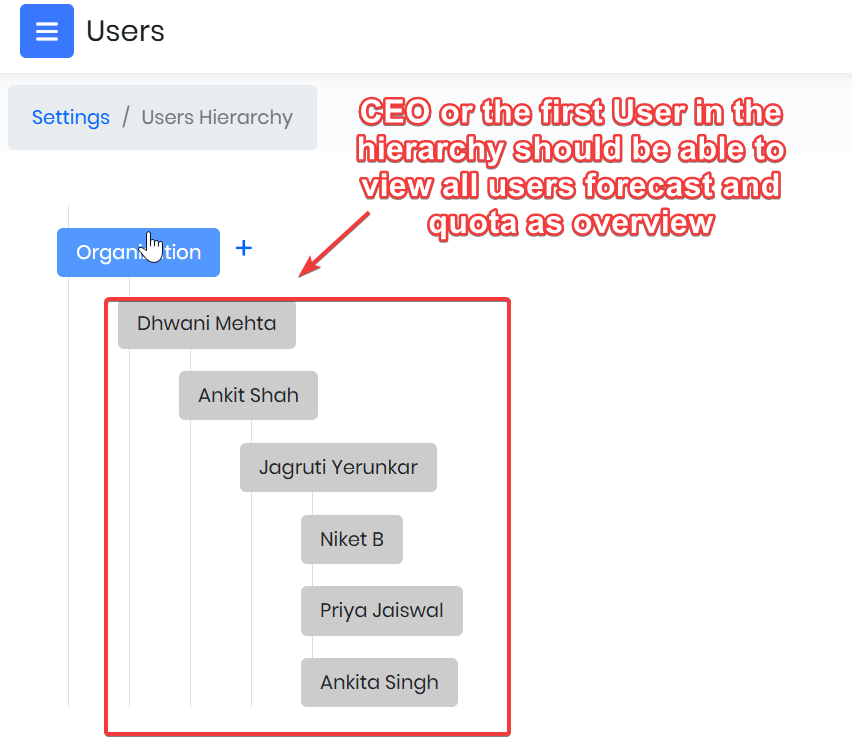
- The first user configured in the CRM user hierarchy - such as the CEO or top-level executive — will have the overview visibility into the Forecast and Quota of all users positioned below them in the hierarchy.
- Admin users, on clicking the Settings icon in the Forecast and Quota module, can display a View option with Default and Executive View options. This will provide a comprehensive view of overall team performance, enabling better strategic oversight.
Group Email ID
- You can now configure the From email ID when cases are created via Webform, API, and CRM, instead of using your default helpdesk email ID. This change will let you set up the group email ID (of the assigned group for a Case record) as the From address.
Partner Portal
- The Drag and Drop option is now available while configuring or rearranging the fields in Settings > Partner Portal layout.
- Changing the display will reflect in the List and other views of the Partner Portal.
Quarterly Reports
- Generate reports segmented by quarters: Jan-March, April-June, July-September, and October-December.
- These will offer you valuable insights into peak performance periods, deal-closure patterns, areas of strength, and track product. This will help you make informed decisions, proactively engage clients through outreach initiatives, and maximize opportunities.
Reports
- You now have the option to exclude Conversion Rate and Record Currency fields from reports.
- When creating a report, Record Currency and Record Conversion Rate are provided as separate selectable fields. This will allow you to include or exclude these columns based on their reporting needs.
- Note: These fields are automatically added when any multi-currency field (e.g., Opportunity Amount) is included in a report.
Tally Sync Settings
- You can apply multiple filters when syncing records between VTiger and Tally. Multiple filters will enable precise record synchronization.
- For example, you can use multiple filters while syncing products between Vtiger and Tally.
- With this change, you will be able to add up to three filters in the Sync Settings page. If you select multiple filters, records will sync from Vtiger to Tally based on the selected filters, ensuring all conditions are met.
Release Notes 1
Enhancements
Tally Sync Settings
- Multiple filtering options while syncing records.
- You can apply multiple filter options for syncing records between Vtiger and Tally.
- For example, you can use filters while syncing products between Vtiger and Tally, where Industry = Technology and Type = Customer for a single record.
- The option to select multiple filters is available in the Sync Settings page. This option is available on Picklist and Multi-Select Combo Box fields.
- Note:
- You can add up to three filters.
- Records will sync only if all selected filters match.