Articles in this section
GenAI Setup in Generative Designer
In this article, you will learn about GenAI Setup in Generative Designer.
V
Vinusha Balasubramanian
24 Mar, 2026 - Updated
3 days ago
Feature Availability
Vtiger Editions: One Growth | One Professional | One Enterprise | One AI
Introduction
The Generative AI Designer in Vtiger CRM is a centralized workspace used to configure AI-powered capabilities. It allows administrators to design AI workflows, configure AI assistants, and manage AI interactions with CRM data.Using the Generative AI Designer, you can create AI assistants, define response instructions, build conversational experiences, and monitor AI interactions.
These capabilities help automate repetitive tasks, improve response accuracy, and increase team productivity.
Within the Generative AI Designer, the GenAI Setup section provides the foundational configurations required to enable AI functionality in Vtiger CRM. You can define how AI retrieves information, generates responses, performs actions, and protects sensitive data.
GenAI Setup Overview
GenAI Setup acts as the core configuration area for enabling Artificial Intelligence features in Vtiger CRM.It defines how Artificial Intelligence interacts with CRM data and how responses are generated during user interactions.
You can configure multiple Artificial Intelligence components, such as data retrieval models, Artificial Intelligence assistants, response instructions, conversational chatflow, and data protection rules. These components work together to ensure that Artificial Intelligence responses remain accurate and secure.
Benefits of Using GenAI Setup
The benefits of using the GenAI Setup are:- Improving response accuracy by retrieving relevant Vtiger CRM data.
- Automating repetitive tasks using Artificial Intelligence Agents.
- Providing faster responses to customer and user queries.
- Generating contextual responses using CRM records and knowledge sources.
- Protecting sensitive information using Data Shield.
- Allowing flexible Artificial Intelligence configuration based on business requirements.
- Components of GenAI Setup
- Accessing the GenAI Setup
Components of GenAI Setup
The key components of GenAI Setup are:- RAG Models
- Agents
- Prompts
- Chatflows
- Data Shield
RAG Models
Retrieval-Augmented Generation (RAG) Models retrieve relevant information from Vtiger CRM data sources before generating responses.RAG Models search selected Vtiger CRM modules, documents, or knowledge sources to identify information related to a user's query. The Artificial Intelligence model then uses this information to generate contextual responses.
Using RAG Models ensures that responses rely on accurate and trusted CRM data, which improves reliability and relevance.
To learn more about RAG Models, click here.
Agents
Artificial Intelligence Agents are intelligent assistants designed to perform specific tasks within Vtiger CRM.Agents can understand specific topics and perform actions such as retrieving information, creating records, or updating records.
Each Agent includes the following components:
- Name – Identifies the Agent.
- Role – Defines the responsibility of the Agent.
- Agent Image – Displays a visual identity for the Agent.
- Purpose – Defines the objective of the Agent.
- Topics – Defines the knowledge areas handled by the Agent.
- Actions – Defines the tasks performed by the Agent in Vtiger CRM.
To learn more about Agents, click here.
Prompts
A Prompt is a set of instructions or questions sent to an Artificial Intelligence model to generate a response.Prompts guide how Artificial Intelligence processes input and produces responses in Vtiger CRM.
Prompts can operate in different modes depending on how the Artificial Intelligence model receives context and data.
Some Prompt modes automatically include Vtiger CRM record data when generating responses.
These modes include:
- Record mode
- Update Record mode
- List mode
- Email mode
The Artificial Intelligence model uses this information to generate responses that are relevant to the specific record.
Other Prompt modes generate responses based primarily on user input.
These modes include:
- Dynamic mode
- Customer mode
- Chatbot mode
When a user submits a query, the system sends the user input along with the Prompt instructions. The RAG Model retrieves relevant information from configured data sources.
The retrieved data and user input together provide context for the Artificial Intelligence model.
This process helps generate more accurate and contextual responses.
To learn more about Prompts, click here.
Chatflows
Chatflows allow administrators to design guided conversational interactions using a visual, no-code interface.A Chatflow defines how conversations progress when users interact with chatbots through supported channels such as websites.
Each Chatflow step can perform actions such as:
- Asking questions.
- Triggering Artificial Intelligence responses.
- Using Prompts or Agents.
Note: Only one Chatflow can remain active for a communication channel.
To learn more about Chatflows, click here.
Data Shield
Data Shield protects sensitive information before Artificial Intelligence processes user input.It automatically detects and masks confidential data patterns during Artificial Intelligence interactions.
Data Shield can mask the following information:
- Email addresses
- Phone numbers
- Social Security Numbers
- Other identifiable personal information
Accessing the GenAI Setup
Before accessing the GenAI Setup, ensure the Calculus AI Add-on is installed from the Extension Store > Add-ons.
Follow these steps to access the GenAI Setup:
- Log in to the CRM.
- Click main Menu.
- Go to Platform.
- Select Generative AI Designer. The Generative AI Designer page opens.
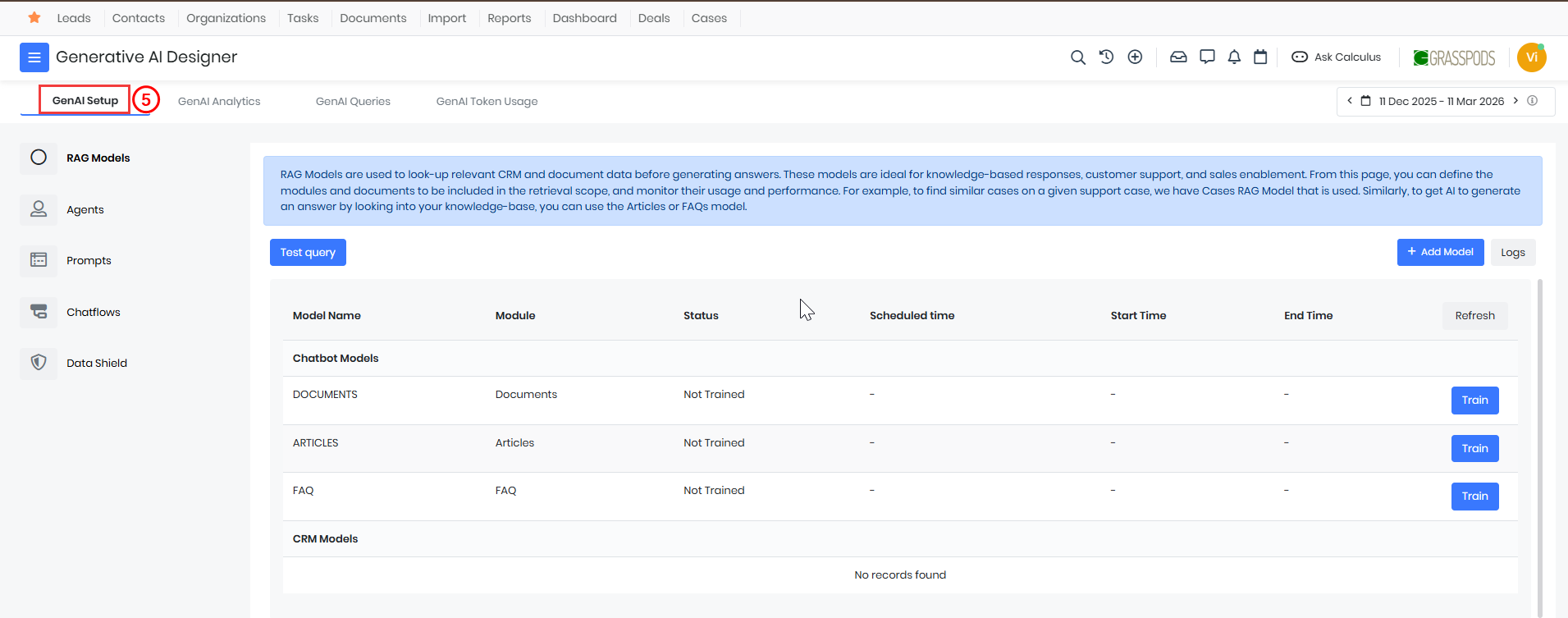
- Click on the GenAI Setup tab. The GenAI Setup page opens.
From this section, administrators can configure RAG Models, Agents, Prompts, Chatflows, and Data Shield.
Best Practices
Follow these best practices when configuring GenAI Setup:
- Use reliable Vtiger CRM data sources when creating RAG Models.
- Write clear and structured Prompts for consistent responses.
- Define Agent purposes and actions clearly.
- Enable Data Shield to protect sensitive information.
Troubleshooting Tips
If Artificial Intelligence responses are incorrect or incomplete:- Verify that the RAG Model data sources contain relevant information.
- Review the Prompt instructions for clarity.
- Check the Chatflow configuration for errors.
- Ensure that Agent actions are configured correctly.