Articles in this section
User Guide for Calculus AI
Feature Availability
Vtiger Editions: One Growth | One Professional | One Enterprise | One AI
Introduction to AI
Artificial Intelligence (AI) is a technology that enables computers and software systems to perform tasks that typically require human intelligence.
AI works by collecting data, analyzing patterns, learning from historical information, and generating predictions or responses. In simple terms, AI follows four major stages:
- Data Collection
- Pattern Recognition
- Understanding Human Language
- Generating Responses and Predictions
Example: When an email application suggests a reply or a shopping website recommends products based on your previous purchases, AI is being used behind the scenes.
How AI Helps Businesses
Businesses use AI to:
- Analyze customer data
- Automate repetitive tasks
- Generate recommendations and insights
- Predict future outcomes
- Improve customer experiences
- Enhance decision-making
In CRM systems, AI helps you understand customer behavior, identify opportunities, improve customer engagement, and streamline business processes.
Introduction to Calculus AI
Calculus AI is Vtiger CRM's AI feature that delivers recommendations, predictions, automation, and content generation within the CRM. It helps sales, support, and management teams to work more efficiently by analyzing CRM data and generating intelligent insights.
Calculus AI was built using technologies such as Machine Learning (ML), Natural Language Processing (NLP), Natural Language Querying (NLQ), Large Language Models (LLMs), Generative AI, and Predictive AI. We at Vtiger are continuously improving and adding AI support to different features in the CRM.
Note: Vtiger CRM users need to install the Calculus AI Add-on to use AI-powered capabilities..
What can Calculus AI do
Calculus AI support is available for different features in the CRM and can:
- Generate summaries and recommendations
- Predict Deal outcomes and sales trends
- Analyze customer sentiment and engagement
- Recommend next-best actions
- Draft emails and responses
- Support chatbot interactions
- Provide coaching and performance insights
- Evaluate customer conversations across channels
Examples
- For sales teams: Calculus AI empowers sales teams with predictive lead scoring, personalized recommendations, and accurate sales forecasting, enabling them to prioritize leads, close deals faster, and focus on high-value opportunities.
- For customer support teams: Calculus AI automates repetitive tasks, offers instant solutions, and analyzes customer behaviour to deliver proactive, efficient support, leading to faster resolutions and higher customer satisfaction.
- Coaching: It aids coaching by providing performance analytics, tracking team metrics, and identifying improvement areas, allowing managers to deliver targeted training and drive continuous team improvement.
Where is Calculus AI available in the CRM
Calculus AI is available in the following modules:
- Contacts
- Deals
- Emails
- Calls
- Meetings
- Cases
- Activities
- Campaigns
- Live Chats
How Calculus AI Works
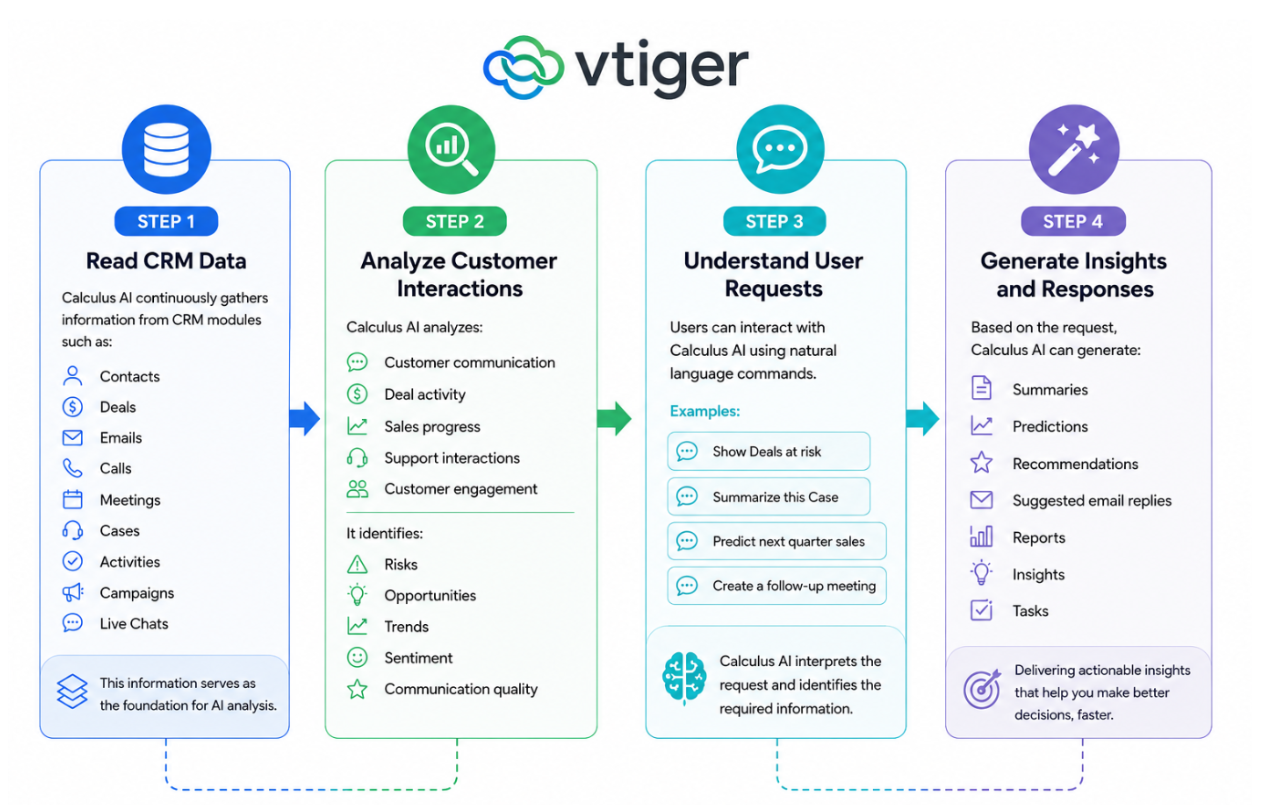
Calculus AI follows a four-step process to generate insights and recommendations.
Technologies Behind Calculus AI
Calculus AI combines multiple AI technologies to deliver intelligent capabilities within the CRM.
- Machine Learning (ML): Machine Learning enables Calculus AI to learn from historical CRM data and identify patterns. It helps predict sales outcomes, analyze customer engagement, and recommend actions.
- Natural Language Processing (NLP): Natural Language Processing helps Calculus AI understand and analyze human language found in emails, chats, phone call transcripts, and customer conversations.
- Natural Language Querying (NLQ): Natural Language Querying allows users to interact with CRM data using everyday language instead of technical commands or filters.
- Large Language Models (LLMs): Large Language Models help Calculus AI understand prompts and generate human-like responses, summaries, recommendations, and content.
Key AI Capabilities of Calculus AI
Calculus AI uses two primary AI capabilities to deliver insights and automation within the CRM.
Generative AI
Generative AI creates new content based on existing CRM information.
It can:
- Generate summaries
- Draft emails
- Recommend responses
- Create chatbot replies
- Produce reports
Examples:
- When you type, Summarize the Deal with ACME, NLQ understands that you are requesting a record summary of the ACME deal. It retrieves the deal data and provides it to Generative AI, which then generates a human-readable summary of that record.
- Similarly, a command like Create a follow-up task for John Smith tomorrow at 10 AM is interpreted through NLQ and executed by Generative AI to create a new record with all relevant details.
Predictive AI
Predictive AI uses historical CRM data to forecast future outcomes.
It can predict:
- Deal closure probability
- Lead conversion chances
- Revenue forecasts
- Customer churn risks
- Engagement trends
Examples:
- When you ask, Show me the deals likely to close this month, NLQ interprets the request, fetches the relevant deal data, and passes it to the Predictive AI. Predictive AI then analyzes the information and returns a list of deals with a high probability of closing.
- Similarly, a command like Predict sales for the next quarter triggers Calculus AI to forecast future sales based on past performance data.
Importance of CRM Data Quality for Calculus AI
Calculus AI relies on CRM data to generate insights, predictions, recommendations, and automation. The accuracy of AI-generated results depends on the quality of information available in the CRM. When CRM records are accurate and up to date, Calculus AI can deliver more reliable recommendations and predictions.
Examples
- Updated Deal stages improve forecasting accuracy.
- Logged customer interactions improve engagement analysis.
- Recorded calls and emails improve sentiment analysis.
- Accurate Contact information improves personalization.
Best Practices for Maintaining Data Quality
To improve AI accuracy:
- Update CRM records regularly.
- Log customer interactions consistently.
- Synchronize email and communication channels.
- Avoid duplicate records.
- Maintain complete activity information.
Benefits of Using Calculus AI
The benefits of using Calculus AI are:
- Supports natural language queries (spoken language): You can query CRM data using natural language, eliminating the need for complex filters or SQL queries.
- Enhances problem-solving: It provides accurate solutions to problems that would otherwise require significant manual effort or expertise in Calculus AI.
- Saves time and makes you efficient: Calculus AI can save time in calculations, allowing users to focus on higher-level decision-making and problem analysis. It can help you automate tasks like creating records, generating reports, and summarizing deals, saving users significant time.
- Reduces errors: It reduces the risk of calculation mistakes as it operates with precision and accuracy, eliminating computational errors and ensuring reliable results.
- Enhances customer service: AI-driven analysis of customer interactions, including emails and calls, helps support agents provide more accurate and efficient responses.
In this article, you will learn about:
- Calculus AI
- Features supported by Calculus AI in Vtiger CRM
Features Supported by Calculus AI
Calculus AI powers multiple features across Vtiger CRM to help sales, support, and management teams work more efficiently. These features use AI to analyze CRM data, generate insights, automate responses, and support decision-making.
Ask Calculus AI
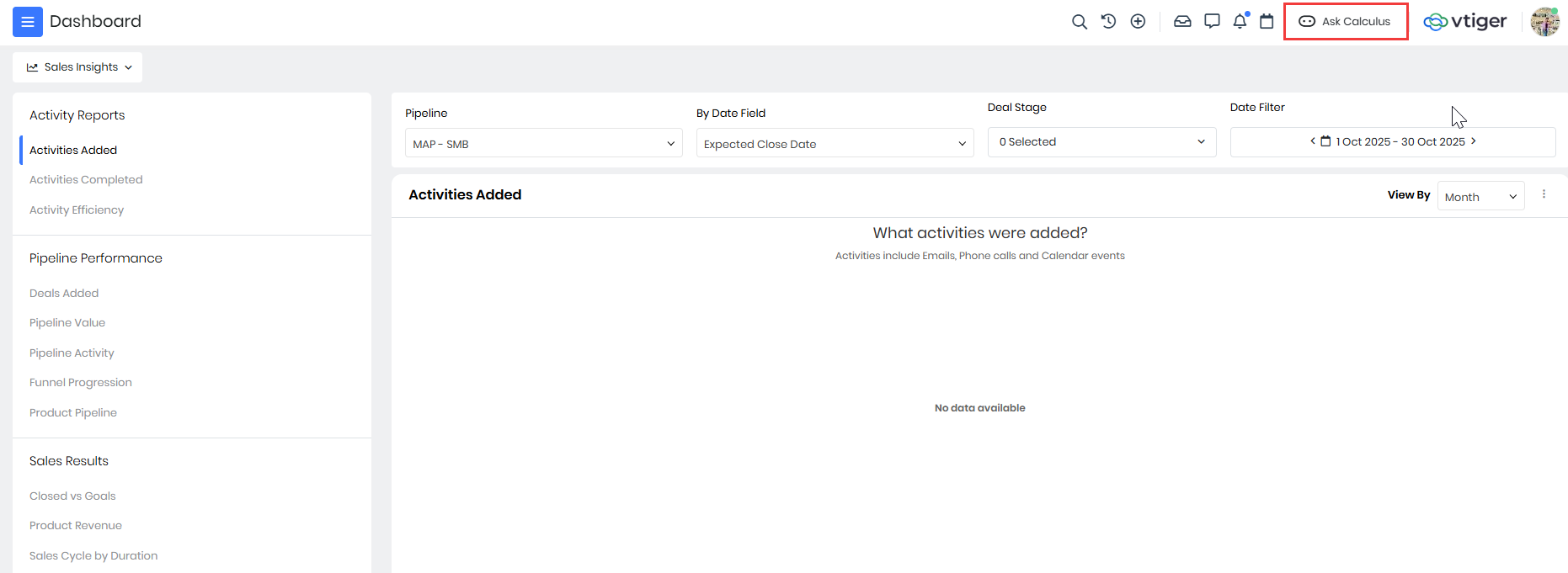
Ask Calculus AI allows users to interact directly with Calculus AI using natural language commands. It is available across CRM modules and helps users retrieve information without navigating through multiple records or applying filters. Calculus AI understands the intent behind user prompts and retrieves relevant CRM information. As users type, it also provides prompt suggestions to guide them.
Example: A sales representative can type the following and Calculus AI retrieves and displays the requested information.
- Show Deals at risk
- Show pending approvals
- Summarize this Case
To learn more about Ask Calculus AI, click here.
Best Time to Contact
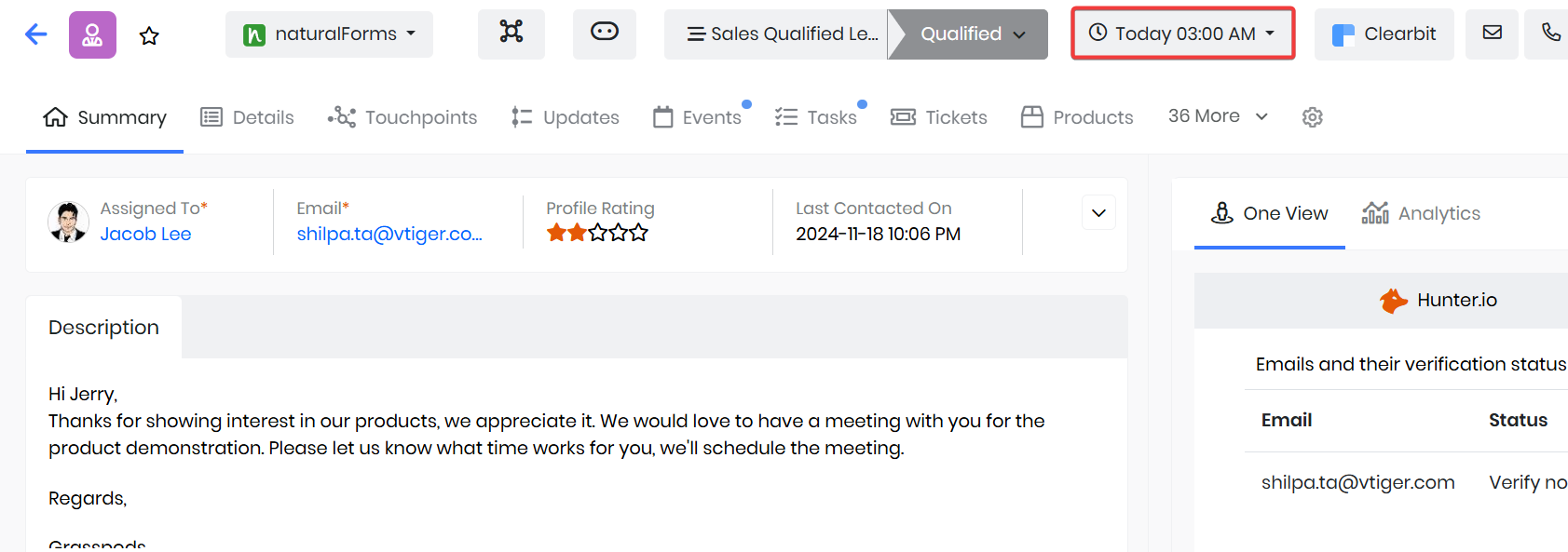
Best Time to Contact helps you to identify the most effective time to reach a customer. Calculus AI analyzes previous customer interactions, such as emails, phone calls, and campaign responses. Based on historical engagement patterns, it predicts when a customer is most likely to respond.
Example: If a customer frequently opens emails and answers calls during weekday mornings, Calculus AI recommends those time slots as the best time to contact them.
To learn more about the Best Time to Contact, click here.
Calculus AI in Cases
Calculus AI assists support agents while responding to Case-related conversations. It generates suggested responses based on the context of the Case. Agents can insert the generated response directly into their conversation and modify it as needed. It can also shorten lengthy responses when required.
Example: A support agent handling a product issue can use Calculus AI to generate a professional response instead of typing the reply manually.
To learn more about Calculus AI in Cases, click here.
Calculus AI in Live Chats
Calculus AI helps agents respond to customer inquiries during live chat conversations. It analyzes customer messages and generates contextual responses that agents can use immediately. It can also shorten generated responses for quicker communication.
Example: When a customer asks about an order status, Calculus AI can suggest a response that the support representative can review and send.
To learn more about Calculus AI in Live Chats, click here.
Chatbot
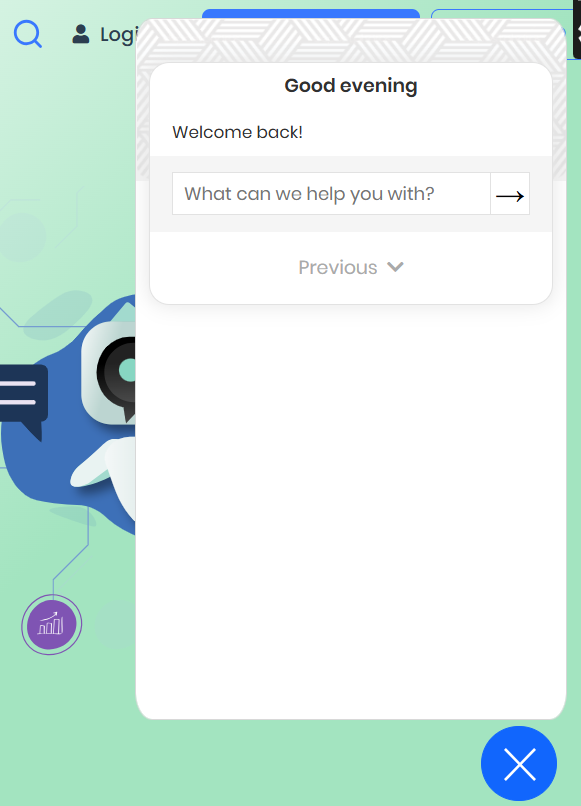
The Chatbot is an AI-powered virtual assistant that responds to customer questions using available knowledge sources. Calculus AI:
- Understands customer questions
- Searches FAQs and articles
- Identifies relevant information
- Generates appropriate responses
Example: A website visitor can ask, How do I reset my password? The Chatbot searches available resources and provides the answer immediately.
To learn more about the Chatbot, click here.
Conversation Insights
Conversation Insights uses Calculus AI to analyze Deal-related customer interactions and provide a consolidated view of customer engagement, sentiment, and Deal progress. It helps sales teams understand customer intent, identify potential risks, and make informed decisions throughout the sales process.
Users can view insights such as:
- Competitors – Identifies competitors mentioned during Deal-related conversations.
- Sentiments – Shows whether customer interactions are Positive, Neutral, or Negative.
- Deal Score – Indicates the overall health and closure potential of a Deal.
- Predicted Close Date – Provides an AI-generated estimate of when the Deal is likely to close.
- Conversation Timeline – Provides a chronological view of Deal-related interactions by channel, category, and sentiment.
- Customer Engagements – Shows customer-initiated interactions across supported channels.
- Touchpoints Summary – Provides a consolidated view of customer interactions and engagement from influencers and decision-makers.
To learn more about Conversational Insights, click here.
Coaching Module
The Coaching module helps managers and sales or customer support representatives improve performance using AI-powered insights and feedback. Calculus AI analyzes customer interactions and provides performance metrics, ratings, and recommendations.
Managers can:
- Review team performance and scorecards.
- Evaluate AI-generated ratings and interaction insights.
- Identify areas where representatives need improvement.
- Provide feedback and assign coaching activities or concepts.
Representatives can:
- View their performance, ratings, and interaction insights.
- Review feedback and suggestions from their managers.
- View assigned coaching concepts and work on areas for improvement.
- Track their progress and performance trends.
Example: A manager identifies that a representative struggles with handling customer objections. The manager can provide feedback and assign a relevant coaching concept. The representative can view the feedback and assigned concept on the Players Dashboard and work on improving the skill.
To learn more about Coaching module, click here.
Coaches Dashboard
The Coaches Dashboard is designed for managers and team leaders. The dashboard provides AI-generated insights and performance metrics based on customer interactions.
Managers can review:
- Calls and emails awaiting review
- Talk-to-listen ratio
- Mood analysis
- Speech rate trends
- Team performance trends
- Suggested coaching topics
Example: A manager can identify which team members require coaching and prioritize reviews accordingly.
Players Dashboard
The Players Dashboard is designed for sales and support representatives. The dashboard provides:
- Interaction summaries
- Ratings
- Reviews
- Coaching recommendations
- Suggested improvements
Example: A support representative can review feedback on customer calls and identify areas for improvement.
Deal Conversation Insights
Deal Conversation Insights provides a centralized view of customer interactions associated with a Deal. Calculus AI helps users understand overall Deal progress and customer engagement after analyzing information from:
- Emails
- Calls
- Meetings
- Chats
- Cases
- Documents
- Campaigns
- Website activity
Components
The Deal Conversation Insights feature consists of the following components:
- Conversation Timeline: Displays a chronological history of customer interactions.
- Touchpoints Summary: Provides an overview of customer engagement across communication channels.
- Stakeholder Analysis: Highlights decision-makers and influencers involved in the Deal.
Example: A sales representative can review interaction history before an important customer meeting.
Deal Health
Deal Health provides a snapshot of a Deal's overall condition and likelihood of successful closure. Calculus AI evaluates multiple signals, including engagement, sentiment, stakeholder involvement, and historical Deal patterns.
It generates the following metrics:
- Predicted Close Date: The AI-estimated date when the Deal is most likely to close.
- Calculus Score: An overall score indicating Deal health and closure probability.
- Fit Score: Measures how closely the Deal resembles previously successful Deals.
- Authority Score: Evaluates the involvement of decision-makers and stakeholders.
- Engagement Score: Measures customer interaction levels across channels.
- Sentiment Score: Analyzes customer communication and identifies positive, neutral, or negative sentiment.
- Calculus Revenue: Predicts expected Deal revenue.
Example: A Deal may have high engagement but low authority involvement. Calculus AI highlights this risk, helping the sales representative engage decision-makers.
To learn more about Deal Health, click here.
Email Assistant
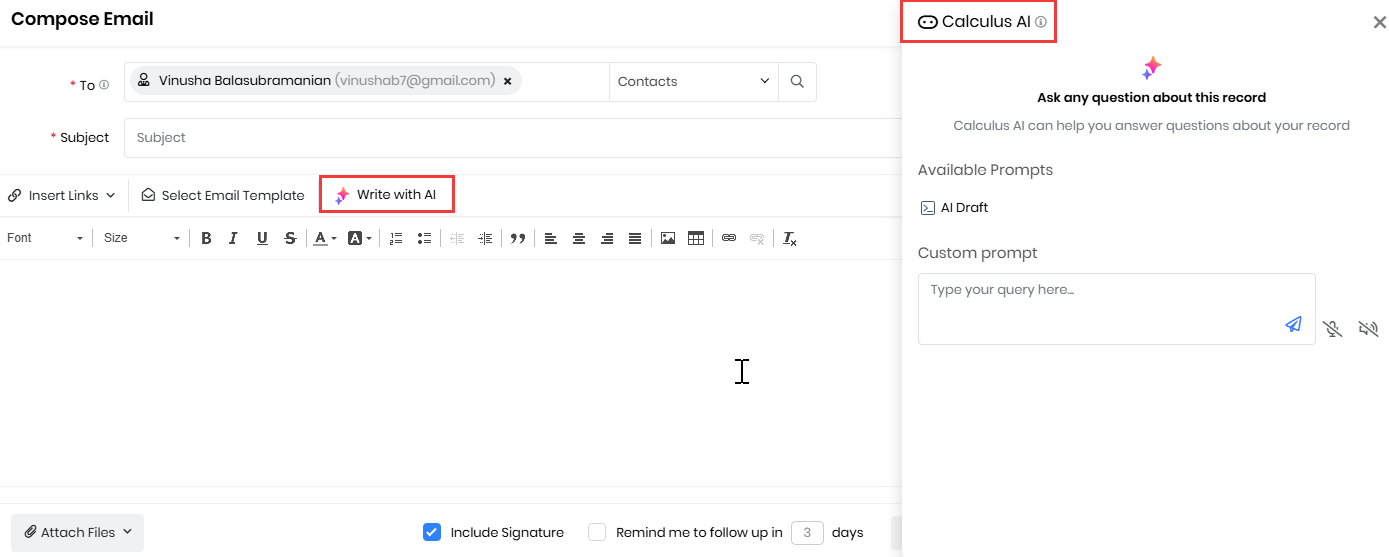
The Email Assistant helps users create, improve, and respond to emails more efficiently.
For outgoing emails, Calculus AI:
- Recommends email templates
- Suggests content improvements
- Reviews grammar and completeness
For incoming emails, Calculus AI:
- Analyzes email content
- Recommends suitable responses
Example: A sales representative can generate a follow-up email after a customer meeting with minimal effort.
To learn more about Email Assistant, click here.
Generative AI Designer
Generative AI Designer is a centralized workspace for managing AI-powered experiences across the CRM. It enables administrators to configure how Generative AI retrieves information and generates responses.
Components
- GenAI Setup: Used to configure AI behavior and capabilities.
- Includes the following:
- RAG Models
- Agents
- Prompts
- Chatflows
- Data Shield
- GenAI Analytics: Provides visibility into AI usage and performance.
- GenAI Queries: Stores user prompts and AI-generated responses for review.
- GenAI Token Usage: Tracks token consumption and AI resource usage.
To learn more about Generative AI Designer, click here.
Insights Designer
Insights Designer helps users create custom reports and dashboards. It enables users to analyze CRM data and visualize information using:
- Tables
- Pivot views
- Charts
- Dashboards
Example: A manager can create a sales performance dashboard to monitor team performance.
To learn more about Insights Designer, click here.
Journey Tasks
Journey Tasks guide sales representatives through the activities required to move Deals through the sales process. Calculus AI helps ensure important activities are completed at the right stage of the customer journey.
Example: A sales representative receives reminders to schedule follow-up meetings before moving a Deal to the next stage.
NLQ Reports
NLQ Reports allow users to interact with CRM data using everyday language. Calculus AI converts natural-language requests into CRM actions and data-retrieval commands.
Example: Users can type the following and receive immediate results:
- Create a follow-up task for John
- Summarize this Deal
- Show pending approvals
To learn more about NLQ, click here.
Predictive AI Designer
Predictive AI Designer allows administrators to create prediction models using CRM data. Calculus AI analyzes historical data and identifies patterns to forecast future outcomes.
Example: Organizations can predict the following:
- Lead conversion probability
- Deal closure likelihood
- Customer churn risk
- Revenue forecasts
To learn more about Predictive AI, click here.
Similar Record Stopwords
Similar Record Stopwords allows administrators to exclude specific keywords when identifying similar records. When stopwords are configured, Calculus AI excludes records containing those keywords from Similar Record results.
Example: If a frequently used generic keyword causes unrelated Deals to appear as similar records, administrators can add it as a stopword.
Signals
Signals help categorize customer communication across emails and phone calls. Calculus AI uses Natural Language Processing (NLP) to detect predefined keywords and phrases within customer conversations.
Based on configured Signals, it can:
- Identify important topics
- Recommend responses
- Display text suggestions
- Suggest email templates
Example: If a customer mentions pricing concerns during an email conversation, Calculus AI can identify the configured pricing Signal and suggest an appropriate response template.
To learn more about Signals, click here.
Calculus AI for Sales
Calculus AI helps sales teams, managers, and other sales users analyze customer interactions and make informed decisions throughout the sales process. It uses AI to identify important insights from sales activities, evaluate deal health, predict outcomes, and recommend actions.
Users can use Calculus AI to:
- Analyze deal-related conversations and identify customer needs, concerns, and buying signals.
- Assess deal health and identify potential risks that may affect deal progress.
- Determine the best time to contact customers based on previous interactions.
- Analyze emails and generate relevant responses using Email Assistant.
- Use AI-powered scores, predictions, and insights to prioritize opportunities and improve sales outcomes.
To learn more about Calculus AI for Sales, click here.
Calculus AI for Customer Support
Calculus AI helps customer support teams, managers, and other support users understand customer interactions and improve the overall support experience. It analyzes customer conversations and support activities to provide insights into customer sentiment, interaction quality, and areas that may require attention.
Users can use Calculus AI to:
- Analyze Cases and identify important information from customer interactions.
- Analyze live chats to understand customer concerns and engagement.
- Evaluate customer sentiment and identify changes in the customer's mood or tone.
- Analyze conversations to understand the quality and effectiveness of interactions.
- Use AI-generated insights to identify issues, improve responses, and provide better customer support.
To learn more about Calculus AI for Support team, click here.