Articles in this section
GenAI Analytics in Generative AI Designer
Feature Availability
Vtiger Editions: One Growth | One Professional | One Enterprise | One AI
Introduction
GenAI Analytics in Vtiger CRM provides a centralized view of how Generative AI features are being used and how effectively they are responding to user queries.
It helps you to analyze chatbot performance using both visual insights and numeric data. By reviewing analytics, organizations can understand how many queries are being handled, what types of queries are being asked, how responses are being evaluated, and where improvements are needed.
GenAI Analytics is useful for monitoring AI performance over time and identifying areas where prompts, FAQs, source content, or AI configurations need to be improved.
GenAI Analytics in Vtiger CRM
GenAI Analytics is a reporting and performance-monitoring feature in the Generative AI Designer.
It provides dashboards and metrics that help you understand how your AI-powered chatbot or AI system is performing based on actual user interactions.
It allows you to analyze:
- Total number of AI queries
- Query review status
- Types of AI responses used
- Query acceptance trends over time
- AI performance using visual charts and metrics
In Vtiger CRM, whenever a query is reviewed or categorized in GenAI Queries, the related metrics are reflected in GenAI Analytics. This helps teams track how well the AI is performing and how response quality changes over time.
Use Case
FreshCart E-commerce uses Vtiger’s AI chatbot to help customers with common support questions related to products, delivery timelines, and order information.
Customers frequently ask questions such as:
- Is this product available?
- What is the delivery time?
- How can I change my order?
The AI chatbot handles these queries using configured prompts, FAQs, knowledge base content, and AI-generated responses.
The support team at FreshCart uses GenAI Analytics to monitor how well the chatbot is handling these interactions.
By reviewing the dashboard, the team notices that:
- A large number of queries are marked as To be Reviewed
- Many queries are being handled as GPT Queries
- The acceptance rate for some product-related queries is low
To improve performance, the team takes the following actions:
- Reviews pending queries in GenAI Queries
- Improves prompts for product-related questions
- Adds or updates FAQs for repeated customer questions
- Trains the related RAG Models so the updated content is available in future responses
Over time, FreshCart sees the following outcomes:
- Increase in accepted AI responses
- Reduction in pending reviews
- Better use of structured knowledge sources
- Improved customer experience and chatbot accuracy
Benefits of GenAI Analytics
The benefits of using GenAI Analytics are:
- Provides visibility into chatbot and AI performance
- Helps identify how AI is handling user queries
- Displays both visual and numeric performance data
- Helps measure response quality over time
- Supports data-driven AI optimization
- Helps improve prompts, FAQs, and knowledge sources
- Improves the overall user experience
In this article, you will learn about:
- Accessing GenAI Analytics
- Understanding the GenAI Analytics Dashboard
Key Terminology
|
|
|
|
|
|
|
|
|
|
|
|
|
|
|
Accessing GenAI Analytics
Before accessing the GenAI Analytics, ensure the Calculus AI Add-on is installed from the Extension Store > Add-ons.
Follow these steps to access the GenAI Analytics page:
- Log in to the CRM.
- Click the main Menu.
- Go to Platform.
- Select Generative AI Designer. The Generative AI Designer page opens.
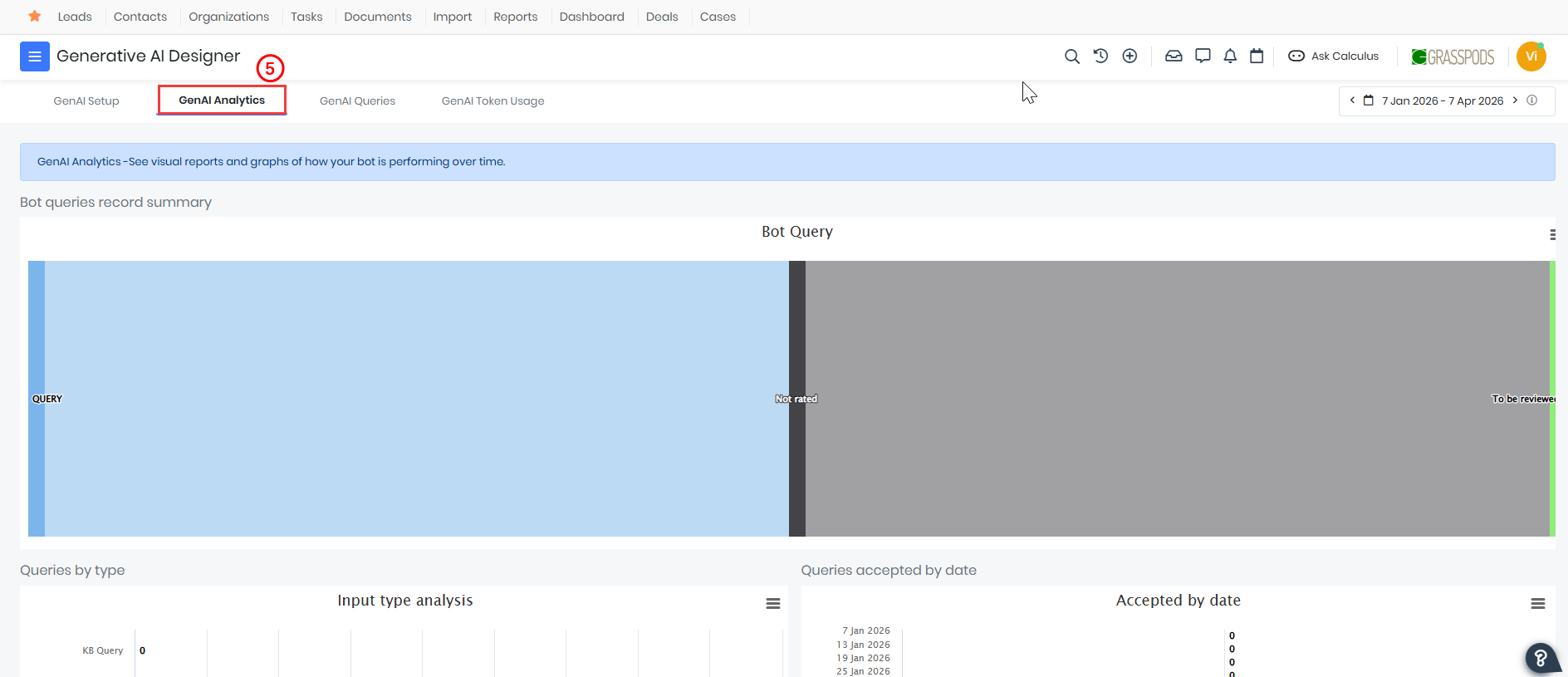
- Click the GenAI Setup tab. The GenAI Setup page opens.
You will be redirected to a dashboard displaying reports and visual analytics.
Components of the Analytics Dashboard
The GenAI Analytics dashboard provides visual representations of bot activity and performance. It includes summary views, graphical reports, and time-based analysis to help you understand how users interact with AI and how the system responds.
The dashboard is divided into multiple sections, each focusing on a specific aspect of AI performance.
Understanding Dashboard Components
Bot Queries Record Summary
The Bot Queries Record Summary provides a high-level overview of all queries processed by the AI system.
It visually represents the distribution of queries based on their current status.
Key highlights:
- Displays total bot queries.
- Shows how many queries are reviewed vs pending.
- Helps identify backlog in query evaluation
Status Classification of Queries
Each bot query is categorized based on its evaluation status. These statuses help track the effectiveness of AI responses.
Common statuses include:
- Not Rated: Queries that have not yet been evaluated by users or administrators.
- To be Reviewed: Queries that require manual review for quality assessment.
- Accepted: Responses that are considered accurate and useful.
- Rejected (if applicable): Responses that did not meet expectations.
- FAQ Created: Queries converted into new FAQ entries.
- FAQ Updated: Existing FAQs improved using AI responses.
Queries by Type (Input Type Analysis)
This section displays a breakdown of queries based on how they are processed by the AI system.
Types of queries include:
- KB Query: Queries answered using the knowledge base.
- Data Query: Queries that fetch data from CRM records.
- Record Creation: Queries that trigger the creation of new records.
- Record Query: Queries related to existing CRM records.
- GPT Query: General AI-generated responses without structured data dependency.
Insights provided:
- Identifies the most frequently used query types.
- Helps understand user behaviour and intent.
- Assists in optimizing AI configurations.
Queries Accepted by Date
This section provides a time-based analysis of accepted AI responses.
Key features:
- Displays accepted queries by date.
- Helps track trends in AI performance over time.
Insights provided:
- Improvement in response accuracy.
- Identification of periods with low acceptance.
- Impact of prompt updates or training changes.
Date Range Filter
The dashboard includes a date range selector that allows you to filter analytics data.
Key capabilities:
- Select custom date ranges.
- Analyze performance within specific periods.
- Compare trends across different timeframes.
Usage:
- Evaluate AI performance after configuration changes.
- Monitor weekly or monthly trends.
Best Practices
Follow these best practices to get the most out of GenAI Analytics:
- Review analytics data regularly.
- Prioritize queries marked as To be Reviewed.
- Reduce dependency on GPT Queries by strengthening KB content.
- Continuously refine prompts based on rejection trends.
- Use date filters to measure the impact of changes.
- Maintain clean and updated training data.
Reference
- Calculus AI
- AI Agent Builder
- Vtiger Chatflows
- Calculus AI: Your Smart Assistant with AI Technology
- Natural Language Query
- Calculus GPT
- Deal Health
- Best Time to Contact
- Contact Sentiment
- Deal Recommendations
- Conversation Insight
- Generative AI Designer
- RAG Model
- GenAI Setup in Generative Designer
- GenAI Queries in Generative Designer
- GenAI Token Usage in Generative Designer