Articles in this section
Maps in Vtiger CRM
Introduction
The Maps feature in Vtiger CRM is available in both Vtiger 360 and Vtiger CRM mobile applications.
Vtiger CRM provides the following map-related features:
- Search for an address from the map view in the app.
- View nearby Leads, Contacts, and Organizations in the app.
- Navigate to their location.
- Schedule your day based on route mapping.
- Do a check-in with geofencing for onsite meetings.
Note:
- Addresses must be valid to get a latitude or longitude value.
- They should have UTF-8 characters only.
- They should have a known location.
- You can go to the lead, contact, or organization record in Maps, and the Navigate button in the record will take you directly to the location. The address in the record is automatically converted to the latitude and longitude values.
- You can also update the lead, contact, or organization address on the map directly and go to the location.
Geofencing is a technique where you can create a virtual geographic boundary, enabling the app to respond when a mobile device enters or leaves a particular area.
Accessing Maps Settings
Follow these steps to view Maps settings in the CRM:
- Log in to the CRM.
- Click the User Menu in the top right corner of the screen.
- Select Settings.
- Go to Configuration.
- Click Maps.
In the Maps settings, Vtiger CRM offers the following services:
- Maps Service - used to convert the address in a record to latitude and longitude values (geocoding) and perform reverse geocoding.
- Route service - used to calculate the shortest route between different meeting locations in a day.
Setting up Maps in the CRM
In Map settings, you can set up Maps Service and Route Service.
Note: You can set up Maps in your CRM account only if you are an administrator.
Maps Service
Maps Service is required for geocoding. It supports two location services that enable you to reach your destination smoothly. They are:
- OpenStreetMap - It is used to search for addresses and get the geocode of an address to store in the database. Geocode shows nearby contacts from any given Lead, Contact, or Organization record. This is a free service and is selected by default in the CRM.
- Google Maps - It performs the same tasks as OpenStreetMap but is more accurate. To enable the Google Maps service, you must activate the Geocoding API, Maps JavaScript API, and Places API in the Google Cloud Console, copy the API key, and paste it into the Google API Key field. Refer to this section for more information.
- OpenStreetMap - 10,000 addresses per day.
- Google Maps - Up to 40,000 addresses per month for free. You get $200 per month free credit. Any usage over that will be chargeable. To know more about Google Maps’ pricing, click here.
Route Service
You must set up the Route service for route mapping. Route service supports two location services that help you find nearby clients and calculate the shortest route between two or more meeting locations. They are:
- OpenRouteService - This service is selected by default in the CRM. To use this service, you must generate an API key by going to this link. Once you have the API key, copy and paste it into the OpenRouteService API Key field. You are allowed to use only 500 requests per day.
- Google - To use this service, you must activate the Directions API in the Google Cloud Console, copy the API key, and paste it into the Google API Key field. Refer to this section for more information.
To know more about using Maps in the mobile app, click here.
Note: When you switch between maps’ services from the Settings page, the records that failed to geocode using the previous map service are retrieved with the newly selected map service.Configuring Google APIs
If you want better search results and accurate addresses of your contacts, you can switch to Google Maps. Before activating Google Maps, you first register for a Google Maps API key.
Follow these steps to get the API key:
Step 1: Logging into the Google API
- Click here to go to the Google APIs dashboard.
- Sign in using your Google account.
- Agree to all the terms and conditions.
You are now logged in to your Google Cloud Platform.
To enable Google APIs, you must select an existing project or create a new project.
Step 2: Creating a Project
- Click the Create Project button on the dashboard.
- Enter the Project name, Organization name, and location of the organization.
- Click the Create button.
A new project is created.
Step 3: Enabling Google APIs
- Click the Navigation Menu icon in the top left corner of the screen.
- Select the APIs & Services option.
- Click the +ENABLE APIS AND SERVICES button on the dashboard.
- Search for Geocoding API.
- Click Geocoding API.
- Click the ENABLE button.
- Follow steps 10, 11, and 12 to enable the other three APIs - Maps JavaScript API, Places API, Distance Matrix API, Routes API, Places API and Directions API.
Step 4: Creating the Credentials
- Click the Navigation Menu icon in the top left corner of the screen.
- Select the APIs & Services option.
- Click Credentials in the left menu.
- Click the +CREATE CREDENTIALS button. You need credentials to use the API.
- Click the API key option.
- A pop-up saying ‘API key created’ will be displayed.
- Click the Copy icon beside the API key and copy it.
- Click RESTRICT KEY to prevent unauthorized use of your key.
- Click CLOSE to finish the configuration.
- Select the APIs in the dropdown that you have enabled in Step 3.
- Click Save.
To finish the configuration, you must enter the API Key details in Vtiger CRM.
Follow the steps below:
- Go to the Google Maps Platform
- Click Keys and Credentials from the menu.
- Click Agree and Continue.
- Set up Payment Information Verification.
- Copy the API Key.
- Paste in Vtiger CRM Maps Settings.
Generating Geocoding Reports
Did you know you can view geocoding reports for the Leads, Contacts, Organizations, and Events modules?
Yes, Vtiger CRM provides you with an option to do so. You can either enable report delivery or check the reports in Maps settings to generate reports.
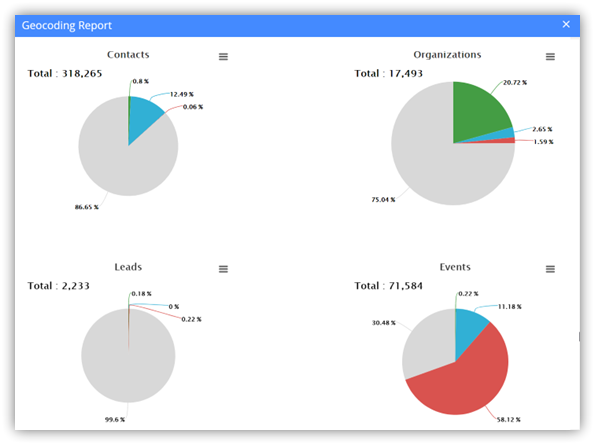
Note: You can enter the frequency of generating a report in the Send GeoCode Report field. It can be Do Not Send, Daily, Every Monday, or First Day of the Month.
Follow these steps to view the reports in Vtiger CRM:
- Log in to the CRM.
- Click the User Menu in the top right corner of the screen.
- Click Settings.
- Go to the Configuration section.
- Click Maps.
- Click View Geocoding Report. The reports of Contacts, Organizations, Leads, and Events are displayed.
- Click the Hamburger icon to print the report or save it as an image.